
MotionGenesis™ Basics
To invoke the program (after the program has been installed):
• Double-click on MotionGenesisStartHere
• Or, from the operating system prompt, type MotionGenesis
• Double-click on MotionGenesisStartHere
• Or, from the operating system prompt, type MotionGenesis
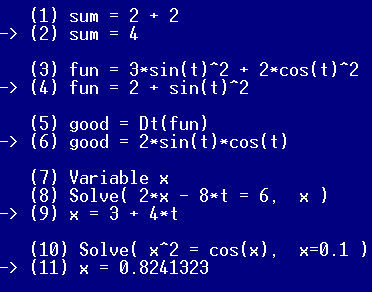
On line (1), type sum = 2 + 2
Press Enter to see the response -> sum = 4.
Press Enter to see the response -> sum = 4.
Enter an expression to see automatic simplification.
fun = 3*sin(t)^2 + 2*cos(t)^2
-> fun = 2 + sin(t)^2
Differentiate with respect to time by typing.
good = Dt(fun)
-> good = 2*sin(t)*cos(t)
To solve a linear algebraic equation for x, type:
Variable x
Solve( 2*x - 8*t = 6, x )
-> x = 3 + 4*t
To solve a nonlinear algebraic equation with a guess for x, type:
Solve( x^2 = cos(x), x = 0.1 )
-> x = 0.8241323
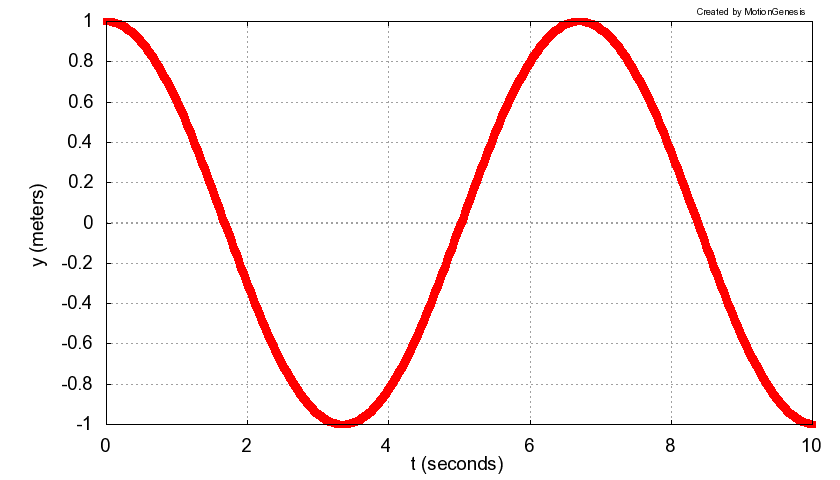
To solve the 2nd-order ODE (ordinary differential equation)
y'' = -sin(y) with initial values
y(0) = 1 m and
y'(0) = 0 m/s, type:
Variable y'' = -sin(y)
Input y = 1 m, y' = 0 m/s
Output t seconds, y meters
ODE() MGDemo % Solve ODE to data file MGDemo.1
Plot MGDemo.1 [1, 2] % Plot y vs. t.
The last line plots data in MGDemo.1,
with the 1st column as the x-axis
and the 2nd column as the y-axis.
Alternatively, to have MotionGenesis™
write the file MGDemo.m
so MATLAB® can solve the ODE and create the plot, type:
Variable y'' = -sin(y)
Input y = 1 m, y' = 0 m/s
OutputPlot t seconds, y meters
ODE() MGDemo.m
To edit MGDemo.txt, use a
text-editor.
For example, edit the file MGDemo.txt
by putting the following comment line at the top of the file (and save the file):
% MotionGenesis: MGDemo.txt
% MotionGenesis: MGDemo.txt
To run the modified MotionGenesis file MGDemo.txt,
re-start MotionGenesis, and type run MGDemo.txt.
Optional**: See Basic YouTube video instructions and/or Basic & Advanced YouTube video instructions.
To save your commands together with output responses,
type: Save MGDemo.html.
To subsequently view that file, go to your computer's MotionGenesis folder and
double-click on the file MGDemo.html.
Online help
For general help and/or a list of commands, type Help
For help with a command (e.g., Solve), type Help Solve
For general help and/or a list of commands, type Help
For help with a command (e.g., Solve), type Help Solve
Other MotionGenesis™ Get Started exercises
| Optional: Special symbols. | ||
| % | Comment delimiter. | % This is a comment. |
| %% | Puts comment into MATLAB® C, Fortran codes. | %% Comment in code. |
| & | Multi-line continuation symbol. | longLine = 1 + 2 + 3 &
+ 4 + 5 + 6 |
| ' | Denotes ordinary time-derivative. | x' and x'' |
| > | Last symbol in the name of a vector. | Fred> |
| [ ] | Used to designate the element of a matrix. | Sue[2,3] = 57.4 |
| , ; | Separates elements and rows in a matrix. | A = [1, 2, 3; 4, 5, 6] |
| : | Denotes a range. | 2:5 denotes 2, 3, 4, 5 |
| :=
:;
| Automatically overwrites an expressions.
Turns SetAutoOverwrite(ON) for current command.
| Keith = 3.8
Keith := 4.2
Keith = 5.5:;
|